TON on-chain data analysis: quickstart on Dune
Learn TON on-chain data analysis on Dune with SQL examples for transactions, messages, addresses, jettons, DEX trades, prices, labels, and faster queries.

Archive note: I originally published this guide on TON Blog on February 25, 2025. After the original page was removed, I restored the article here from the Internet Archive, together with its original cover and six illustrations. The SQL and methodology below are preserved as published; check the linked queries and current documentation before using them in production.
Quick Answer
TON on-chain data analysis on Dune starts with the raw ton.blocks, ton.transactions, and ton.messages tables. Because TON is asynchronous, filter messages by direction and use block_date to keep queries efficient. Dune also provides address-conversion functions, decoded jetton and DEX tables, daily prices, materialized views, and TON Foundation labels. Together, these datasets let you measure transactions, active wallets, token transfers, trading volume, liquidity, and application activity with SQL.
This is the first part of the guide. Continue with advanced TON user, balance, and token-flow analysis.
With TON now the exclusive blockchain for Telegram’s mini app ecosystem, Web3 is reaching over 950 million users—bringing crypto into the hands of everyday people like never before. But with this kind of explosive growth, how do we track what’s actually happening on-chain?
This is where data comes in. As TON’s ecosystem expands, on-chain analytics are key to understanding user behavior, adoption trends, and DeFi activity. In this article, we’ll break down TON’s architecture and how you can use Dune’s blockchain data tools to make sense of this fast-growing network.
TON Blockchain: architectural features
In TON Blockchain's unique asynchronous architecture, transactions are driven by messages—data packets exchanged between users, applications, and smart contracts. Each message carries specific instructions for the recipient, such as updating storage or initiating further messages, and can be inbound (sent to a contract) or outbound (sent from a contract).
To ensure messages are processed in the correct order, TON employs Logical Time (LT) to sequence events. Unlike traditional blockchains that process transactions sequentially, TON’s asynchronous nature and sharding allows any single action—for example, a DEX swap—to generate multiple messages which may be processed in multiple blocks. This design enables high scalability and parallel transaction processing, making TON well-suited for handling large transaction volumes efficiently.
Because of these structural differences, TON operates differently from EVM-based chains, which can make it challenging to onboard new builders into the ecosystem. To bridge this gap, TON Foundation has organized TON’s blockchain data into a public data lake (see ton-etl for details), making on-chain data more accessible and allowing analysts to work with familiar tools like SQL and Dune.
This guide will use Dune as an example to explore and analyze TON Data. A full list of supported tables is available in the official Data Catalog.
Getting started with TON data on Dune
Dune is a blockchain analytics platform that simplifies querying, visualizing, and interpreting on-chain data. It supports both EVM and non-EVM chains, including TON, allowing users to analyze public datasets, run SQL queries, and compile them into dashboards.
To get started:
- Sign up for a free account on Dune.
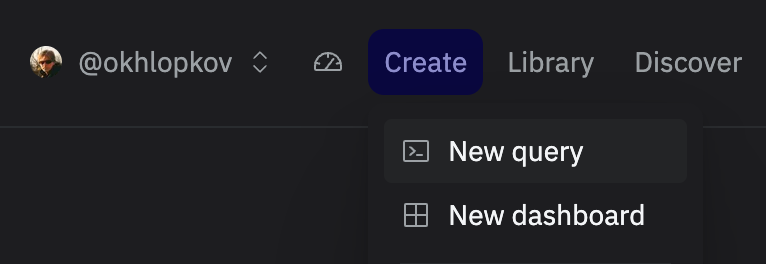
- Once registered, click Create, then select New query from the dropdown menu.
Understanding TON data on Dune
All available data on Dune can be divided into the following categories:
- Raw data
- Decoded data
- Views and materialized views
- Off-chain data uploads
Tables: blocks, transactions, and messages
TON Blockchain’s raw data is presented in a handy tabular format:
ton.blockston.transactionston.messages
These tables contain fundamental and low-level information about TON’s network activity, including account states, flags, opcodes, sources and destinations of the interaction.
Querying TON transactions
Let’s write our first query. For each date in the last 30 days, we’ll calculate the average number of transactions per second.
SELECT
    block_date,
    COUNT(*) * 1e0 / (24 * 60 * 60) AS tps_avg
FROM ton.transactions
WHERE block_date >= NOW() - INTERVAL '30' DAY
GROUP BY 1
*Source: https://dune.com/queries/4681120*
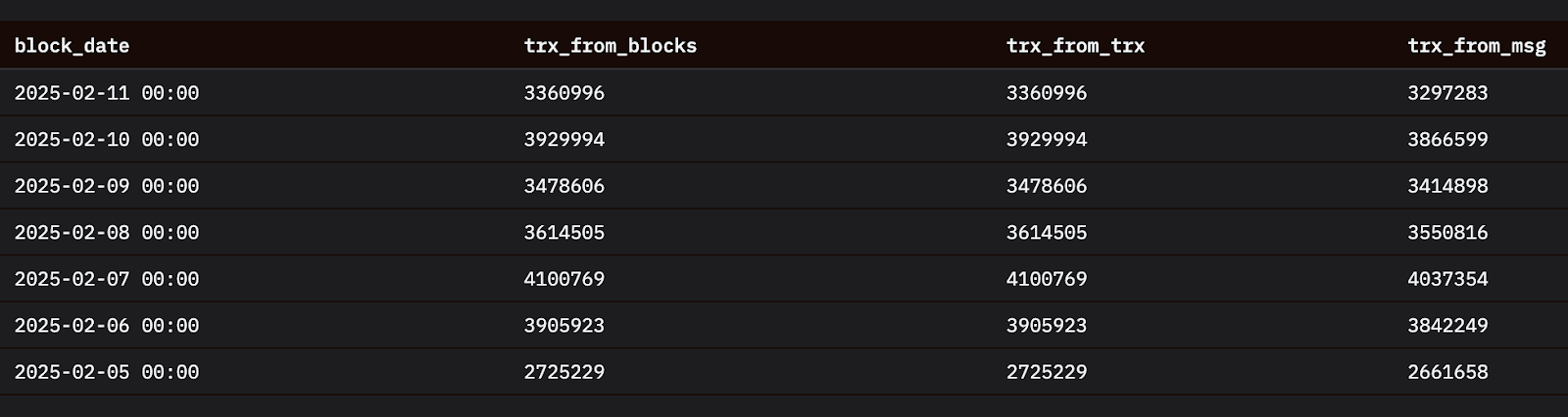
We can calculate the same transaction count not only using the ton.transactions table but also ton.blocks and ton.messages. Note that some transactions do not generate any messages, such as system tick-tock transactions by Elector Contract.
*Source: https://dune.com/queries/4711221*
Direction of a message
*Source:* *TON documentation: Messages and transactions*
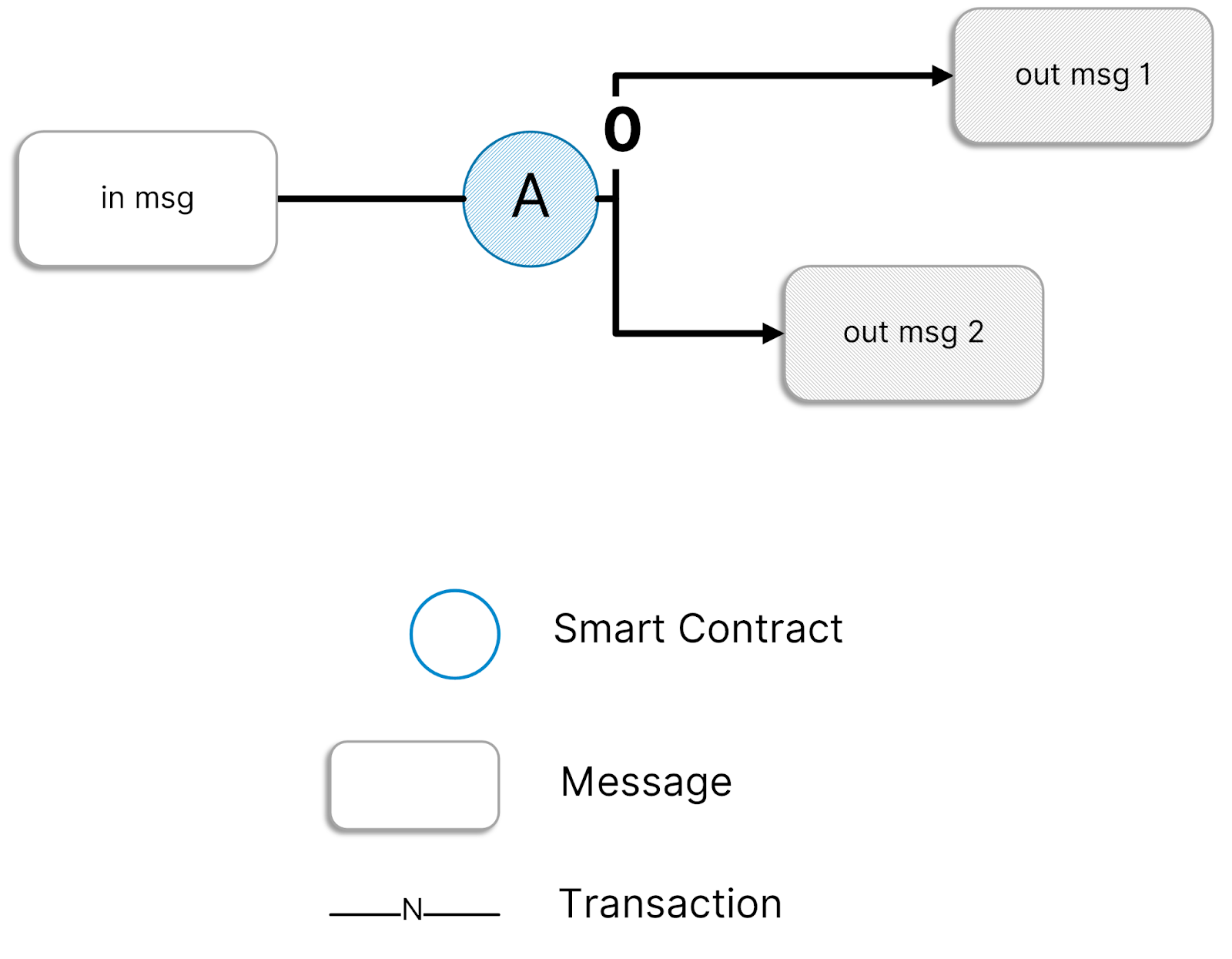
In TON Blockchain, a transaction has one incoming message (excluding some special cases) but can generate multiple outgoing messages (including zero), forming a graph-like structure that's complex to analyze. Most of the messages have two transactions involved—one for source and another for destination. To make data structure immutable, those messages are stored twice and ton.messages table includes a "direction" column with:
- ‘in’: Generated once a message is sent
- ‘out’: Generated once a message is received
Note that there are three types of messages:
- External: Source is null, only direction = ‘in’ is present
- Internal: Both source and destination are non null, both direction = ‘in’ and direction = ‘out’
- Logs (also known as External Out): Destination is null, only direction = ‘out’ is present
If you are filtering messages, it is recommended to add a direction filter. For most analyses, it is better to use direction = ‘in’ if you don’t need to check the resulting transaction, and direction = ‘out’ otherwise.
For example, to find who executed a smart contract, filter for direction = ‘in’ and destination = [contract address]. This structured approach helps navigate TON’s asynchronous message-driven architecture.
How to make queries faster
TON’s blockchain produces terabytes of data, meaning poorly optimized queries can be slow. To write fast queries, you need to select only the data you actually need—the columns and date partitions.
When you do SELECT COUNT(*) FROM ton.transactions, you load more than 2 billion rows—that takes a lot of computation and your query may take a while. For the majority of the analysis, you need to work with the latest data only. All the raw TON tables are partitioned by the “block_date” column so each time you filter by it, you load less data and make your query faster.
To optimize queries:
- **Don’t use SELECT \*:** Read only columns you actually need
- Filter by block_date: Read only rows you actually want to
Address format
There are several widely used ways to present a TON Blockchain address: raw bytes (starts with ‘0:’), user-friendly (starts with ‘UQ’), and bounceable user-friendly (starts with ‘EQ’). The upper raw format is used in all Dune tables.
If you need to cast a user-friendly address to a raw format or vice-versa, you can use these exclusive transform functions on Dune:
- ton_address_raw_to_user_friendly()
- ton_address_user_friendly_to_raw()
For more details, check out the TON-specific Dune functions.
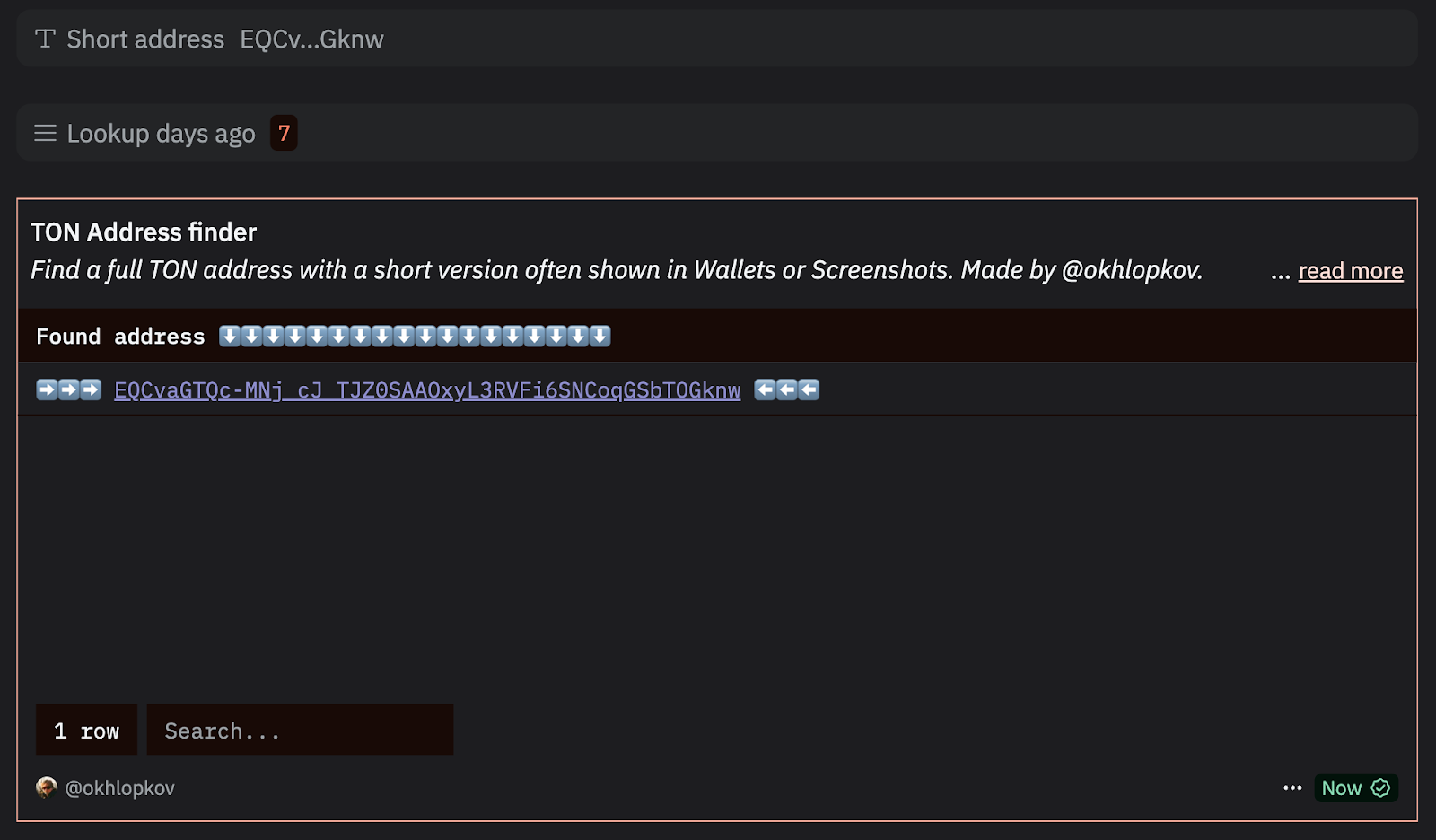
Why is this useful? Sometimes, TON wallet addresses appear in a shortened format in wallets or screenshots. This query helps retrieve the full address from its abbreviated version.
Transaction hash formats
Imagine you found an interesting transaction on TON and want to see its representation in Dune. You may notice that the format of transaction hash in Dune tables differs from the one you see in Tonviewer:
- Tonviewer: 692263ed0c02006a42c2570c1526dc0968e9ef36849086e7888599f5f7745f3b
- Dune: aSJj7QwCAGpCwlcMFSbcCWjp7zaEkIbniIWZ9fd0Xzs=
Use this snippet to convert Tonviewer’s format to the Dune’s:
SELECT *
FROM ton.messages
WHERE tx_hash = to_base64(
    from_hex(
        '692263ed0c02006a42c2570c1526dc0968e9ef36849086e7888599f5f7745f3b'
    )
)
Tables: jetton events, DEX trades and DEX pools
Some on-chain activity has been decoded and presented in a handy tables, such as:
Ton.jetton_events:Transfers, mints, and burns of jetton tokensTon.dex_trades:Trades made on decentralized exchanges (DEXs) and launchpadsTon.dex_pools:Snapshots of LP pool TVL at each block
There is more decoded data yet to come. Tables for NFT activity may already be available, so be sure to check the full list of tables here: TON Data Catalog
Let’s calculate the total transaction volume and number of active wallets that used USDT on TON over the past 30 days:
SELECT
    block_date
    , SUM(amount) * POWER(10, -6) AS volume_usd
    , COUNT(DISTINCT source) AS active_wallets
FROM ton.jetton_events
WHERE 1=1
    AND block_date >= NOW() - INTERVAL '30' DAY
    AND jetton_master = UPPER('0:b113a994b5024a16719f69139328eb759596c38a25f59028b146fecdc3621dfe')  - USDT jetton master
    AND type = 'transfer'  -- only transfers
    AND tx_aborted = FALSE  -- only successful trx
GROUP BY 1
ORDER BY 1 DESC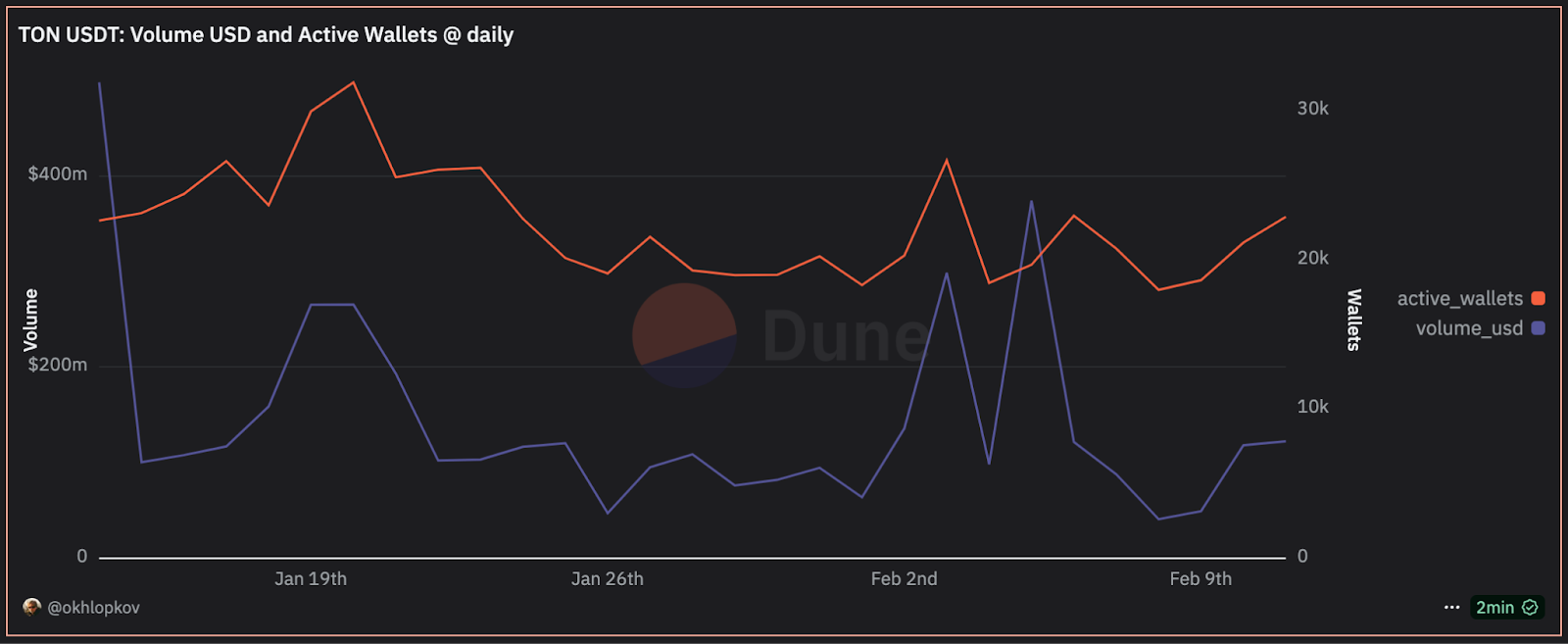
*Source: https://dune.com/queries/4711590*
To find the addresses with the highest DEX trading volume in the last 30 days, you can use the ton.dex_trades table:
SELECT
    GET_HREF(
    'https://tonviewer.com/' || trader_address,
    trader_address
    ) trader,
    SUM(volume_usd) volume_usd
FROM ton.dex_trades
WHERE block_date >= NOW() - INTERVAL '30' DAY
GROUP BY 1
ORDER BY 2 DESC
LIMIT 100
*Source: https://dune.com/queries/4711814*
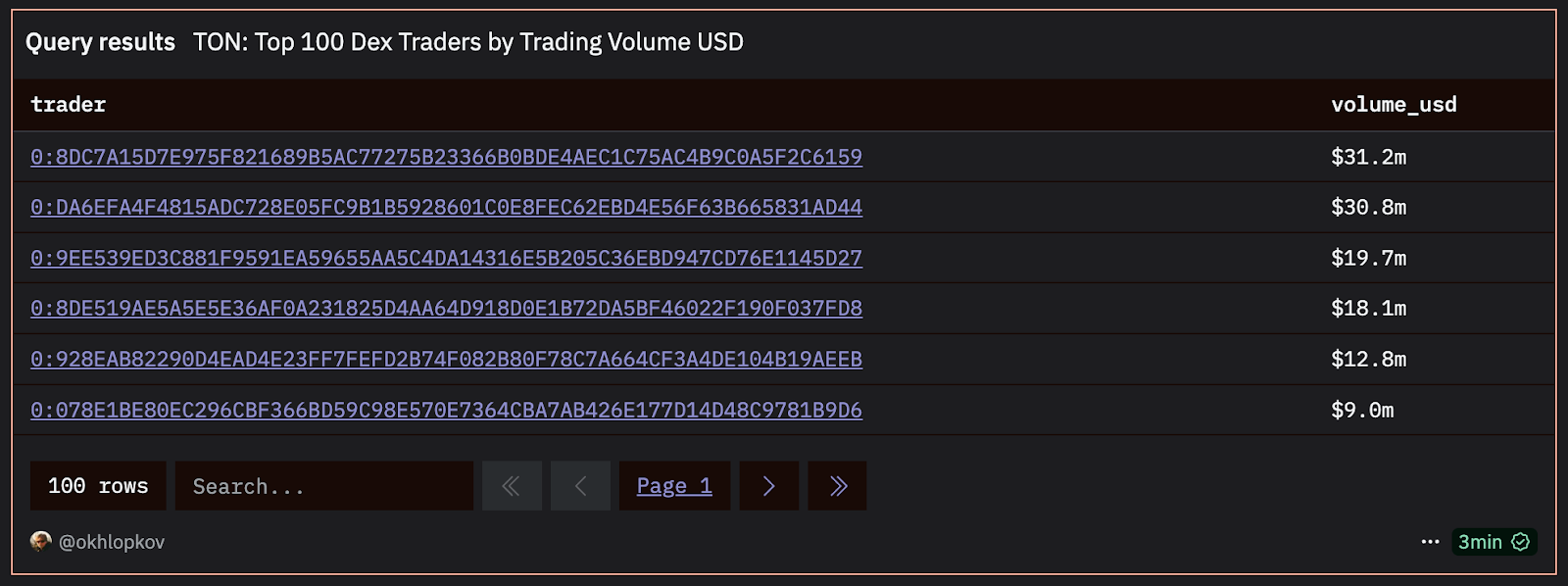
Dune’s GET_HREF function allows you to add clickable links to your table, making your queries and dashboards more interactive and user-friendly.
Materialized views
A materialized view is a SQL query transformed into a real table to simplify calculations of more complex queries.
Jetton metadata latest values
Some jettons allow metadata updates even after contract deployment. To track these changes, all snapshots of metadata values are stored in ton.jetton_metadata. That said, it’s more practical to use the latest value of a jetton metadata to extract decimals or symbols. That’s why we created this materialized view: dune.ton_foundation.result_ton_jettons_metadata_latest_values (Source query: https://dune.com/queries/4412605)
DEX pools latest and daily values
The ton.dex_pools table contains all snapshots of a liquidity pool’s TVL. However, most queries only require:
- Latest values:
dune.ton_foundation.result_dex_pools_latest(Source query: https://dune.com/queries/4423827) - Daily values:
dune.ton_foundation.result_dex_pools_daily(Source query: https://dune.com/queries/4414366)
Jetton and TON daily prices
When working with multiple tokens, determining their USD or TON values is essential. The price of a jetton can be defined using the ton.dex_trades table, but if you need daily price data, you can use the ton.prices_daily table. If you’re interested in how we generate this price feed for TON, jettons, LP, and SLP tokens from raw data, you can explore the code here: GitHub.
Bonus: labels
At TON Foundation, we find and label addresses that belong to popular DeFi, GameFi, and other apps built on TON. All labels are stored in github and uploaded to Dune (table dune.ton_foundation.dataset_labels).
You can use the labels like this:
SELECT
    COUNT(DISTINCT M.source) total_users
FROM ton.messages M
INNER JOIN dune.ton_foundation.dataset_labels L
    ON M.destination = L.address
WHERE 1=1
    AND M.direction = 'in'
    AND L.organization = 'evaa'
Check Application Activity dashboard to see how these labels can be used: https://dune.com/ton_foundation/application-activity.
Continue exploring TON data
Want to dive deeper? For additional materialized views and resources, check out:
- TON Quick Start
- Popular dashboards on Dune
Join the TON Data Hub community
Stay updated with the latest news, integrations, and data insights. The TON Data Hub is a space for devs, analysts, and ecosystem contributors to collaborate.
- Get news, updates, and insights
- Connect with TON’s top projects and data experts
- Participate in contests, hackathons, and paid dashboard requests
Join now: TON Data Hub